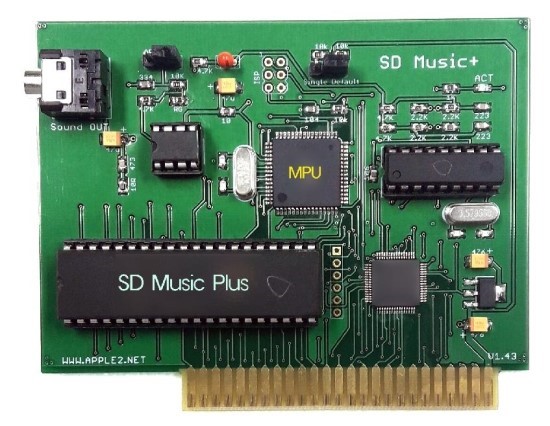
SD Music (Plus) Firmware Update Recommendation (Firmware V1.0E)
After removing the SWITCH BLOCK, power on your SD Music (Plus) card.
If you hear the "ding-dong" startup sound, your SD Music (Plus) is running firmware V1.0E and supports self-firmware updates. I strongly recommend downloading the latest firmware and updating it when it becomes available.
If you do not hear any startup sound, your board is running an older firmware version that does not support self-updating. In that case, you can send your SD Music (Plus) board to me for a free firmware update.
This update improves the volume balance of the Mockingboard emulation and adjusts the Volume, Envelope, and Noise response to more closely match the characteristics of the actual AY-3-8910 sound chip.
The default sound has also been refined to sound smoother, calmer, and less harsh. Several minor firmware issues have been corrected, and overall operating stability has been improved.
Update Instructions
Download the attached disk image and either create a physical floppy disk or prepare your system to boot directly from the disk image.
Make sure the Apple II is powered off.
Remove the S/W block from the SD Music Deluxe card.
Install the SD Music Deluxe card in Slot 4 of the Apple II.
Boot the Apple II using the attached firmware update disk image.
When the instructions appear on the screen, press the Enter key.
Do not turn off the Apple II while the firmware update is in progress.
When the update has completed successfully without any errors, you will hear a “Ding-Dong” completion sound.
After hearing the completion sound, turn off the Apple II, reinstall the S/W block in its original position, and use the card normally.
An Apple II expansion card is not complete simply because it performs the expected function.
Bus timing, signal processing, software compatibility, circuit design, and stability on real machines must all be carefully tested and verified. Ian Research Lab develops and manufactures hardware cards that operate directly within the Apple II system.
Recently, many low-cost emulator products have appeared, using general-purpose MCUs such as the Raspberry Pi Pico to imitate the behaviour of existing expansion cards through software.
An emulator is a substitute that reproduces the responses of the original device through programmed logic.
Even if AI can reproduce the voice and singing style of a famous singer, it does not become the real singer. In the same way, even if a Pico imitates the input and output behavior of an Apple II expansion card, it does not become the same kind of hardware as the original card.
The visible function may appear similar, but the internal operating principles, design methods, and product value are fundamentally different.
Low-cost MCU emulators offer the advantages of affordability and convenience. However, those who value hardware that operates directly on the Apple II bus, accurate compatibility, proven stability, long-term maintenance, and collectable value should use a different standard when choosing a product.
Apple II Products
CP/M Turbo7 A high-speed CP/M SoftCard equipped with a 7 MHz Z80 CPU.
A2 Turbo A 16 MHz 65C02 accelerator card designed for the Apple IIe.
Hypersion 512KB A memory expansion card that combines four 128KB Saturn-compatible memory banks for a total capacity of 512KB. It also includes an integrated No-Slot Clock.
SD DISKII Plus A disk emulator card that allows an SD memory card to operate as Apple II floppy-disk drives and hard-disk storage.
It is not merely a general-purpose development board placed on an adapter. It is dedicated hardware designed specifically for the Apple II disk environment, compatibility, and practical everyday use.
A2Z80 A modern reinterpretation of the PCPI Z80 card, designed as a 16 MHz Real Z80 system card.
With the optional expansion board installed, it can also operate as a versatile game system compatible with MSX, ColecoVision, and Sega SG-1000 software, using a standard joystick.
APMSX An MSX-compatible system card operating at speeds of up to 7.16 MHz with 512KB of memory.
It includes a PS/2 keyboard port, joystick ports, stereo audio outputs, and NTSC video output.
The Apple II and MSX systems operate simultaneously. Through DMA, APMSX directly controls the SD DISKII Plus and boots MSX software through a virtual floppy-disk environment.
APMSX is not simply an emulator program. It is an independent MSX hardware system operating inside the Apple IIe.
Simple Joystick A simple and practical joystick designed for direct use with the Apple IIe, Apple IIc, and Apple IIGS.
Its button layout is especially optimised for comfortable play in games such as Lode Runner.
SD Music Plus A first-generation FM sound card equipped with a real YM2413 sound chip.
It supports Mockingboard emulation and allows music to be performed in a unique YM2413 Remix style through VGM Player and IMS Player.
SD Music Deluxe A stereo FM sound card equipped with a real OPL3 YMF262 sound chip.
It supports Mockingboard emulation and allows Apple II users to play the OPL music once enjoyed through AdLib sound cards on the PC, using VGM Player and IMS Player.
Ian Lab does not merely imitate the output of existing products or copy their functions.
We design real hardware specifically for the Apple II and add original ideas, expanded capabilities, and new ways for users to enjoy their systems.
Do not choose a product simply because its functions appear similar.
Choose genuine Apple II hardware built with real engineering, original ideas, and a clear design philosophy.
버스 타이밍, 신호 처리, 소프트웨어 호환성, 회로 구성, 실제 기기에서의 안정성까지 모두 검증해야 합니다. 이안 연구소는 이러한 과정을 직접 거쳐 Apple II에서 실제로 동작하는 하드웨어 카드를 개발·제작합니다.
최근에는 Pico와 같은 범용 MCU를 이용해 기존 카드의 동작을 프로그램으로 흉내 내는 저가형 에뮬레이터 제품이 많이 등장하고 있습니다.
에뮬레이터는 원래 장치의 반응을 프로그램으로 재현하는 대체품입니다.
AI가 유명 가수의 목소리와 창법을 비슷하게 재현한다고 해서 그 AI가 진짜 가수가 되는 것은 아닙니다. 마찬가지로 Pico가 슬롯카드의 입출력을 흉내 낸다고 해서 원래의 하드웨어 카드와 같은 제품이 되는 것도 아닙니다.
겉으로는 같은 기능처럼 보여도 내부의 동작 원리와 설계 방식, 제품의 가치는 분명히 다릅니다.
저가형 MCU 에뮬레이터는 가격이 낮고 간편하다는 장점이 있습니다. 그러나 실제 Apple II 버스에서 회로가 직접 동작하는 하드웨어, 정확한 호환성, 안정성, 장기적인 유지보수와 소장 가치를 중요하게 생각한다면 선택의 기준도 달라져야 합니다.
*************Apple II 제품*************
CP/M Turbo7 7 MHz Z80 CPU를 탑재한 고속 CP/M SoftCard입니다.
A2 Turbo 16MHz 65C02 CPU를 탑재한 Apple IIe용 가속기 카드입니다.
Hypersion 512KB Saturn 128KB 메모리 뱅크 4개를 구성하여 총 512KB로 확장한 메모리 카드입니다. No-Slot Clock 기능도 함께 탑재했습니다.
SD DISKII Plus SD 메모리 카드를 Apple II용 플로피 디스크 드라이브와 하드 디스크로 사용할 수 있도록 개발한 디스크 에뮬레이터 카드입니다. 단순한 범용 보드 조립품이 아니라, Apple II의 디스크 환경과 실제 사용 편의성을 위해 직접 설계한 전용 하드웨어입니다.
A2Z80 PCPI Z80 카드를 현대적으로 재해석하여 설계한 고속 16MHz Real Z80 시스템 카드입니다. 옵션 보드를 설치하면 MSX, ColecoVision, SG-1000 계열의 게임을 조이스틱으로 즐길 수 있는 다기능 Z80 시스템으로 확장됩니다.
APMSX 최대 7.16MHz와 512KB 메모리로 동작하는 MSX 호환 시스템 카드입니다. PS/2 키보드 포트, 조이스틱 포트, 좌우 사운드 출력과 NTSC 영상 출력을 지원합니다.
Apple II와 MSX 시스템이 동시에 동작하며, DMA를 통해 SD DISKII Plus를 직접 구동합니다. 실제 플로피 디스크처럼 부팅하여 다양한 MSX 프로그램을 실행할 수 있는, Apple IIe 위에서 동작하는 독립적인 MSX 시스템 카드입니다.
Simple Joystick Apple IIe, Apple IIc, Apple IIGS에서 바로 사용할 수 있는 간단하고 실용적인 조이스틱입니다. 특히 Lode Runner를 편리하게 즐길 수 있도록 버튼 위치를 구성했습니다.
SD Music Plus 실제 YM2413 사운드 칩을 탑재한 1세대 FM 사운드 카드입니다. Mockingboard 에뮬레이션을 지원하며, VGM Player와 IMS Player의 Remix 기능을 통해 YM2413 특유의 음악을 연주합니다.
SD Music Deluxe 실제 OPL3 YMF262 사운드 칩을 탑재한 스테레오 FM 사운드 카드입니다. Mockingboard 에뮬레이션을 지원하며, VGM Player와 IMS Player를 이용해 PC의 AdLib 카드에서 즐기던 OPL 음악을 Apple II에서 재생합니다.
이안 연구소는 단순히 기존 제품의 결과만 흉내 내거나 기능을 복사하지 않습니다.
Apple II를 위한 실제 하드웨어를 직접 설계하고, 기존 제품에는 없었던 독창적인 아이디어와 새로운 사용 경험을 더합니다.
기능만 비슷한 제품이 아니라, 개발자의 설계와 철학이 담긴 진짜 Apple II 하드웨어를 선택하십시오.
Support for selected games that require SmartPort functionality
Support for HDD images up to 512 MB
The existing ProDOS Block Device interface remains fully supported, so current programs and disk images can be used without any changes.
ROM BIOS V1.90N adds SmartPort and large-capacity HDD support while maintaining compatibility with existing software.
Updating the ROM BIOS requires replacing or reprogramming the ROM chip installed on the card.
Free ROM BIOS Update Service
When sending any of my products to me for repair or service, you may also include your SD DISK ][ PLUS card. I will update its ROM BIOS free of charge.
Shipping costs are not included.
ROM Chip by Mail
To receive a programmed ROM chip by mail, please contact me by email.
ROM chip: US$2
Worldwide shipping: US$15
Customers who wish to update the ROM themselves using a ROM programmer may also contact me by email to request the ROM image.
This modified version of the Apple II game Rescue Raiders adds real-time MIDI sound effects through a MIDI card installed in Slot 2.
Gunfire, helicopter machine guns, bombs, missiles, collisions, explosions, and base destruction sounds are triggered directly by the game’s internal events.
Different weapons and explosions use different sounds and volume levels, creating a much more dynamic battlefield experience.
File filtering function: only loadable files are displayed depending on FDD / HDD mode.
Greatly increased file listing capacity: 1,500+ files, which is practically enough for normal use.
“/” swap function: swap D1 <> D2 files.
Key input is no longer case-sensitive.
The screen is automatically refreshed after deleting a file.
Fixed the MORE display “[+]” bug.
Image file size is now displayed in KB / MB.
Smart Cache bug fixes and improvements
Fixed an issue in the write-back cache function when using HDD mode, which could potentially cause problems during heavy write operations.
Smart Cache and several related routines have also been optimized in ASM for higher speed.
SmartPort ready
SmartPort support is already prepared. It will work immediately after upgrading the BIOS ROM chip.
Larger HDD capacity support: With OS support, up to 512 MB per HDD drive can be read and written. ProDOS itself is limited to 32 MB.
**Improved FDD R/W function
This version also includes faster FDD R/W.
However, depending on the NIB image, some disk images may read very slowly. If you copy the disk again using a disk copy tool on the Apple II, the image will be automatically optimized.
You can simply overwrite the disk image with itself using a copy tool such as DISK MUNCHER V1.0 or COPY II PLUS.
Many FDD disk copy programs are supported, including:
Copy the ROM file to the root directory of the SD memory card.
When booting the Apple II, press [S] to enter the SD File Manager.
Press “*”, then press “Y” to start the firmware update.
This version has not been fully tested yet, so there may still be some bugs. Please let me know if you find any issues, and I will reflect them in the next update.
I have finally completed IMS PLAYER for the Apple IIe.
This is the only IMS music player that runs on the Apple IIe. I put almost every feature I could possibly implement into it.
Main Features
Unlimited Music File Size Playback
IMS PLAYER uses a HIDDEN READING method, allowing even very large IMS files to be played all the way to the end without file size limitations.
Massive Instrument Support
Each IMS file can use up to 128 instruments.
Instrument search is performed in two stages:
First, IMS PLAYER searches for a BNK file with the same name as the IMS file.
If some instruments are still missing, it searches again in STANDARD.BNK.
If the instrument still cannot be found, it plays using the default selected instrument sound.
The larger the BANK file, the longer the search time.
Example:
160KB BANK file / about 4,000 instruments: about 4 seconds
670KB BANK file / 15,867 instruments: about 11 seconds
For an 8-bit computer, this is very fast. ^^; While making an IMS player, I somehow ended up building a database search engine.
At first, searching instruments in a 160KB BANK file took 33 seconds. In the final version, it was reduced to about 4 seconds.
Original Stereo Mode
IMS PLAYER supports my own STEREO ON/OFF function, designed to preserve the original character of the music as much as possible.
It first assigns instruments to left, center, or right based on the instrument names, then dynamically rearranges them in real time using my own algorithm depending on the music.
It does not ruin the original feel of the song, and it creates a pretty nice harmonic stereo effect.
Powerful Storage Expansion
An HDD is required, and up to 8 HDD volumes are supported.
In the demo screen, two 32MB HDDs are connected through emulation.
Visual UI Elements
Using an optimized ISR interrupt routine, IMS PLAYER supports:
11-channel level meter
Progress bar at the bottom of the screen
Complete Percussion Support
Percussion is fully supported.
Fast and Intuitive UI & Jukebox
Up to 384 IMS files can be displayed in a single directory.
Non-displayed files such as BNK files do not count toward this limit.
IMS PLAYER also supports a JUKEBOX function, allowing continuous playback upward or downward through the file list.
You can put your favorite songs into one folder, start playback, and leave it running while doing something else.
Pause and volume control are also supported. Very useful when you get a phone call.
Required System
Hardware:
Apple IIe
65C02 CPU
64KB RAM or more
Sound card:
SD Music Deluxe OPL3 card is required
Development Note
During development, I also implemented a file sorting function.
However, it was not very useful in real use and only consumed memory, so I boldly removed it from the final version.
IMS PLAYER will soon be uploaded to the link previously provided to SD Music Deluxe card buyers.
Development was not easy and took a lot of effort. If you enjoy this software, even a small donation would be greatly appreciated.
For questions, please contact me by message or email.
Now, please enjoy the real Apple IIe demonstration.
It has been quite a long time since I last produced the LCD Dial.
In the early days, the quality of the LCD parts was fairly good. However, as demand suddenly increased, the quality of the supplied LCD modules dropped significantly. In some cases, the modules were almost unusable, so I had no choice but to stop production.
During that time, it became difficult to source high-quality LCDs, so I only made them for a few people who specifically requested them.
This time, I have decided to move away from the old monochrome LCD and am currently working on new firmware for an upgraded version.
Both the display capability and overall functions will be greatly improved.
The current display size is 128×128. Since future changes are not too difficult, I decided to start with this size first.
The backlight characteristics are also different, and the clearer display makes it much easier to read.
Once the firmware work is complete, I will provide the improved LCD Dial.
The number of IMS files selectable from the menu has been increased from 254 to 384.
I think this should be enough for normal use.
Volume Control
You can now increase or decrease the volume while the music is playing.
Pause / Resume During Playback
During playback, you can press the SPACE key to pause or resume the song.
JUKE BOX Support
My favorite “JUKE BOX” feature is also working well.
You can play songs continuously, and choose whether the next song should be selected upward or downward in the file list.
Progress Bar
A progress bar is shown at the bottom of the screen, so you can roughly see how far the music has progressed.
I tried to add as many useful features as possible while still keeping the performance optimized.
As a result, the Apple II can now play IMS music much better than I originally expected.
Honestly, I put a lot of passion and effort into this program.
Please listen to the music. When X-WAY is turned on in the middle of playback, you can hear the sound change.
System Requirements
Apple //e with 65C02
SD Music Deluxe card
Features
IMS music file playback support.
With Hidden Reading, there is effectively no file size limit. The sample song above is 65KB.
Remaining Work
If an instrument cannot be found, or if the included BNK file is missing, the player will load STANDARD.BNK and fill in the missing instruments automatically.
I also plan to continue speed optimization, especially for faster instrument searching in large STANDARD.BNK files.
Please consider getting an SD Music DX card, and please give lots of love to the IMS Player as well. ^^
I’ve been working on an IMS music player for the Apple II. (It required the SD Music DX OPL3 card)
IMS file: For those interested in the technical specs of the 1990s Korean Chiptune/MIDI format (.IMS) powered by Yamaha OPL chips, here is the detailed English wiki page. https://moddingwiki.shikadi.net/wiki/IMS_Format
A 20KB buffer is not enough for longer songs, so the player must read more IMS data from disk while the music is playing. I have already done similar work in my MIDI and VGM players, so I plan to bring that experience into this IMS player as well.
I’m also planning a few UI features:
A level meter, so the screen feels alive while music is playing.
A progress display, so users can roughly see where they are in the song.
There are still many details to solve, but the player is finally starting to take shape.
The previous version felt a bit plain during music playback, so after considering several options, I added a level meter.
However, the VGM and DRO formats have very little timing margin during playback, making it difficult to apply the level meter. IMF has relatively more timing flexibility, so the level meter has been applied to the IMF format first.
It is currently under testing, and if no issues are found, it will be released as an official version.