블로그 이미지
안녕하세요? 이안입니다. 과학의 모든것을 좋아합니다. 이안김

카테고리

분류 전체보기 (506)
NOTICE (14)
SALE (8)
자유 게시판 (41)
◆ APPLE II (55)
◆ SD Smart Drive (15)
◆ SD DISK II (87)
◆ SD Music card (34)
◆ SD MIDI ][+ (24)
◆ Mockingboard 4c (22)
◆ Hyperion 512K RAM+ (5)
◆ Accelerator (10)
◆ PS2 Adapter (9)
◆ Z80 Card (24)
◆ APMSX (29)
◆ APV40 (0)
◆ FC-150 (15)
◆ i86 PC (20)
◆ MPU 관련 (9)
◆ CPLD (1)
◆ RF (5)
◆ 진공관및 오디오 (25)
◆ AutoBike (13)
◆Other (28)
비공개 연구실 (1)
★ 개인방 (1)
스크랩 (0)
임시보관함 (0)
Total
Today
Yesterday

달력

« » 2026.7
1 2 3 4
5 6 7 8 9 10 11
12 13 14 15 16 17 18
19 20 21 22 23 24 25
26 27 28 29 30 31

최근에 올라온 글

SD Music (Plus) Firmware V1.0F
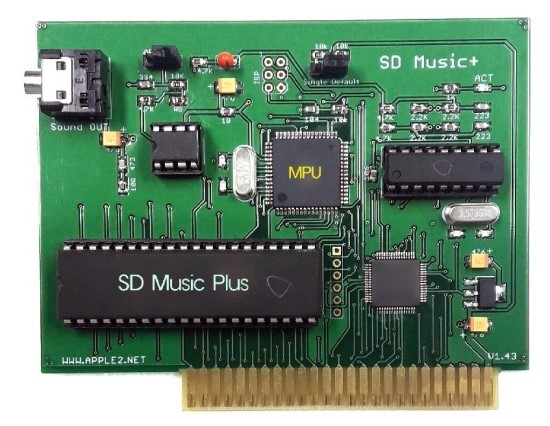
Firmware V1.0F builds upon the Mockingboard emulation introduced in V1.0E and improves Envelope and Noise playback stability, as well as high-speed Direct Mode command processing.

When Noise and Envelope effects were used simultaneously on the two AY sound chips, the resulting sounds could become mixed together or muddy. V1.0F improves the separation and clarity of these sounds.

It also fixes a Direct Mode issue in which some OPLL commands could be missed when IMS Player or VGM Player transmitted commands in rapid succession.

Users who use Mockingboard-compatible software, IMS Player, or VGM Player are advised to update to V1.0F.

The SD Music Plus card is an enhanced version of the SD Music card that adds mixing of the Apple II internal speaker output. Apart from several minor improvements, the two cards are fundamentally similar.


Main Improvements

Mockingboard Emulation Improvements

  • Improved Envelope ending timing and volume handling
  • Improved Mockingboard data input timing
  • Maintained the volume balance and playback characteristics adjusted through comparison with an actual Mockingboard

Direct Mode Stability Improvements

  • Eliminated the possibility of missing commands when OPLL registers and data are transmitted in rapid succession
  • Improved timing for continuous sound-data input

Other Improvements

  • Optimized internal sound processing
  • Improved playback stability with Mockingboard-compatible software

Operating Mode Selection

The operating mode is selected using the SWITCH BLOCK located at the upper-right corner of the board.

Right Position: Default Mode

  • Supports VGM Player and IMS Player
  • This is the normal operating position.
  • When certain Mockingboard programs produce no sound, move the switch to the left position.

Left Position: Mockingboard ONLY Mode

  • Dedicated mode for Mockingboard-compatible software
  • Disables the SD Music Command Mode
  • Use this mode for Mockingboard programs that produce no sound in Default Mode.

Some older Mockingboard programs do not initialize the 6522 according to the standard procedure, causing a conflict with the SD Music Command Mode.

Mockingboard ONLY Mode is provided so that these programs can still be used. However, the underlying problem is in the software, and its initialization code should ultimately be corrected by the software developer.

With the SWITCH BLOCK Removed

When the computer is powered on with the SWITCH BLOCK removed, the card enters Firmware Update Mode.

When the SWITCH BLOCK is removed after the card has started normally and the Apple II is then RESET, the card enters the hidden Envelope OFF Mode. In this mode, Envelope effects are disabled and sounds are played at a constant volume.

Firmware Update Procedure

  1. Prepare the attached firmware image as a bootable disk image.
  2. Turn off the computer with the SWITCH BLOCK removed from the SD Music Plus board.
  3. Install the SD Music Plus card in Apple II slot 4.
  4. Turn on the computer.
  5. If a “ding-dong” startup sound is heard, the card supports self-firmware updating.

If no “ding-dong” startup sound is heard, the card has an early firmware version without the self-update function. These early firmware versions also do not support IMS Player or VGM Player.

In this case, send the board to us and we will update it to the latest firmware free of charge. The user is responsible for shipping costs.


    6.Follow the on-screen instructions and press Enter to begin the update.

When the update is completed successfully, a repeating “ding-dong, ding-dong” sound will be heard.

If an error occurs, a repeating “ding, ding” sound will be heard. Turn the computer off and on again, then retry the update from Step 4.


    7.After the update has completed successfully, turn off the computer, reinstall the SWITCH BLOCK in its original position, and use the card normally.


V1.0F is the recommended update because it fixes the Noise and Envelope interference issue found in V1.0E, as well as the high-speed Direct Mode command-loss issue.


Additional firmware updates may be provided if further problems are discovered or additional improvements are required.
 

FMUPPLUS.nib
0.22MB


Posted by 이안김
, |


How to solve the compatibility issue with the SD Music card.


Most older Mockingboard programs correctly follow the official initialization procedure:

LDA #$FF
STA DDRA

LDA #$07
STA DDRB

It is the initialization procedure documented by Sweet Micro Systems, the original manufacturer of the Mockingboard.


However, a small number of programs do not follow this standard and initialize both DDRA and DDRB with #$FF.

This can cause compatibility problems with enhanced Mockingboard-compatible cards such as the SD Music Plus and SD Music Deluxe.

SD Music cards provide additional features, including selectable instruments and direct commands for the OPLL and OPL3 sound chips.

The upper Port B lines, which are unused under the original Mockingboard specification, are used to distinguish normal Mockingboard data from these extended commands.


When software follows the official initialization and sets DDRB to #$07, only PB0–PB2 are configured as outputs.

PB3–PB7 remain inputs, exactly as specified in the original Sweet Micro Systems documentation.

When software incorrectly sets DDRB to #$FF, PB3–PB7 also become outputs.

This can cause ordinary Mockingboard control values to be interpreted as SD Music extended commands.

In practice, when Mockingboard software does not work correctly with an SD Music Plus or Deluxe card, incorrect DDRB initialization is the cause in almost every case.

Please update the program to follow the original Sweet Micro Systems initialization procedure:

LDA #$FF
STA DDRA

LDA #$07
STA DDRB

Following the official Mockingboard initialization standard will maximize compatibility with the original Mockingboard and with modern compatible sound cards.

'◆ SD Music card' 카테고리의 다른 글

SD Music Plus Firmware V1.0E  (1) 2026.07.13
SD Musix Deluxe Firmware V1.0E  (0) 2026.07.06
IMS Music player for SD Music Card  (0) 2026.06.09
IMS PLAYER for SD Music Deluxe  (0) 2026.06.05
IMS Player revising  (0) 2026.05.24
Posted by 이안김
, |

SD Music Plus Firmware V1.0E

Firmware V1.0E focuses primarily on improving Mockingboard emulation.

The instrument sound has been changed and may sound less refined than in earlier firmware versions. However, this is an essential update for users who require basic Mockingboard functionality and support for IMS Player and VGM Player.

IMSPLAYER https://quick09.tistory.com/1588

VGMPLAYER  https://quick09.tistory.com/1440


Main Improvements

  • Improved Mockingboard emulation
  • Improved envelope playback
  • Improved noise and sound-effect playback
  • Unified the instrument sound to a single voice better suited for Mockingboard emulation
  • Improved volume balance and playback characteristics
  • General bug fixes and overall stability improvements

The volume balance and sound characteristics were carefully adjusted through listening comparisons with an actual Mockingboard.


Operating Modes

The operating mode can be selected using the SWITCH BLOCK located at the upper-right side of the board.


Right Position: Default Mode

  • Supports VGM Player and IMS Player
  • Recommended for normal use
  • If some Mockingboard software does not produce sound, move the switch to the left position


Left Position: Mockingboard ONLY Mode

  • Intended exclusively for Mockingboard-compatible software
  • Use this mode when Mockingboard software does not produce sound in Default Mode


SWITCH BLOCK Removed

If the SWITCH BLOCK is removed before powering on the system, the board enters Firmware Update Mode.

There is also a hidden Envelope OFF Mode. While the system is powered on and operating normally, remove the SWITCH BLOCK and then press RESET.

In this mode, envelope effects are disabled and envelope-controlled sounds are played at a fixed volume.


Firmware Update Instructions

  1. Prepare the attached disk image so that it can be booted.
  2. Power off the Apple II and remove the SWITCH BLOCK from the SD Music card.
  3. Install the SD Music (Plus) card in Slot 4.
  4. Power on the Apple II.If you do not hear the “Ding-Dong” startup sound, the board has an early firmware version without the self-update function. IMS Player, VGM Player, and related features are not supported by this early firmware.
  5. In this case, send the board to us and we will update it to the latest firmware free of charge. Shipping costs are the responsibility of the user.
  6. If you hear the “Ding-Dong” startup sound, your board supports self-firmware updating.
  7. Press Enter to begin the firmware update.
  8. When the update is completed successfully, the board will repeatedly play a “Ding-Dong, Ding-Dong” sound.
  9. If an error occurs, the board will repeatedly play a “Ding, Ding” sound. Power the system off and on, and then try the update again.
  10. After the update has completed successfully, power off the system, return the SWITCH BLOCK to its original position, and use the board normally.

Additional updates may be released later if further issues are found or improvements are required.

FMUPPLUS.nib
0.22MB


https://youtu.be/v3V_hRhyOhc


Why didn’t this software work before?

The 6522 initialization used by this software does not follow the original Mockingboard initialization procedure documented by Sweet Micro Systems, the original manufacturer of the Mockingboard.

As a result, the software’s 6522 Port B configuration conflicted with the SD Music card’s extended command mode.

The latest SD Music firmware now includes a switch setting that disables command mode. With this setting enabled, the card operates only as a standard Mockingboard, allowing the software to work correctly.

However, this firmware setting is a compatibility workaround, not the fundamental solution. The software developer should correct the 6522 initialization to follow the official Sweet Micro Systems specification:

LDA #$FF
STA DDRA

LDA #$07
STA DDRB

Correcting the software will provide maximum compatibility with the original Mockingboard as well as modern Mockingboard-compatible sound cards.

Please refer to the following link for more details:

https://quick09.tistory.com/1599


Standard Mockingboard INITIALIZATION

How to solve the compatibility issue with the SD Music card. Most older Mockingboard programs correctly follow the official initialization procedure:LDA #$FFSTA DDRALDA #$07STA DDRBIt is the initialization procedure documented by Sweet Micro Systems, the o

quick09.tistory.com


'◆ SD Music card' 카테고리의 다른 글

Standard Mockingboard INITIALIZATION  (0) 2026.07.14
SD Musix Deluxe Firmware V1.0E  (0) 2026.07.06
IMS Music player for SD Music Card  (0) 2026.06.09
IMS PLAYER for SD Music Deluxe  (0) 2026.06.05
IMS Player revising  (0) 2026.05.24
Posted by 이안김
, |

This update improves the volume balance of the Mockingboard emulation and adjusts the Volume, Envelope, and Noise response to more closely match the characteristics of the actual AY-3-8910 sound chip.

The default sound has also been refined to sound smoother, calmer, and less harsh. Several minor firmware issues have been corrected, and overall operating stability has been improved.


Update Instructions

  1. Download the attached disk image and either create a physical floppy disk or prepare your system to boot directly from the disk image.
  2. Make sure the Apple II is powered off.
  3. Remove the S/W block from the SD Music Deluxe card.
  4. Install the SD Music Deluxe card in Slot 4 of the Apple II.
  5. Boot the Apple II using the attached firmware update disk image.
  6. When the instructions appear on the screen, press the Enter key.
  7. Do not turn off the Apple II while the firmware update is in progress.
  8. When the update has completed successfully without any errors, you will hear a “Ding-Dong” completion sound.
  9. After hearing the completion sound, turn off the Apple II, reinstall the S/W block in its original position, and use the card normally.

Thank you


FMUPD10E.nib
0.22MB

'◆ SD Music card' 카테고리의 다른 글

Standard Mockingboard INITIALIZATION  (0) 2026.07.14
SD Music Plus Firmware V1.0E  (1) 2026.07.13
IMS Music player for SD Music Card  (0) 2026.06.09
IMS PLAYER for SD Music Deluxe  (0) 2026.06.05
IMS Player revising  (0) 2026.05.24
Posted by 이안김
, |

Real Apple II Hardware

NOTICE / 2026. 7. 6. 09:42

We Build Real Apple II Hardware

An Apple II expansion card is not complete simply because it performs the expected function.

Bus timing, signal processing, software compatibility, circuit design, and stability on real machines must all be carefully tested and verified. Ian Research Lab develops and manufactures hardware cards that operate directly within the Apple II system.

Recently, many low-cost emulator products have appeared, using general-purpose MCUs such as the Raspberry Pi Pico to imitate the behaviour of existing expansion cards through software.

An emulator is a substitute that reproduces the responses of the original device through programmed logic.

Even if AI can reproduce the voice and singing style of a famous singer, it does not become the real singer. In the same way, even if a Pico imitates the input and output behavior of an Apple II expansion card, it does not become the same kind of hardware as the original card.

The visible function may appear similar, but the internal operating principles, design methods, and product value are fundamentally different.

Low-cost MCU emulators offer the advantages of affordability and convenience. However, those who value hardware that operates directly on the Apple II bus, accurate compatibility, proven stability, long-term maintenance, and collectable value should use a different standard when choosing a product.


Apple II Products 

CP/M Turbo7
A high-speed CP/M SoftCard equipped with a 7 MHz Z80 CPU.


A2 Turbo
A 16 MHz 65C02 accelerator card designed for the Apple IIe.


Hypersion 512KB
A memory expansion card that combines four 128KB Saturn-compatible memory banks for a total capacity of 512KB. It also includes an integrated No-Slot Clock.


SD DISKII Plus
A disk emulator card that allows an SD memory card to operate as Apple II floppy-disk drives and hard-disk storage.

It is not merely a general-purpose development board placed on an adapter. It is dedicated hardware designed specifically for the Apple II disk environment, compatibility, and practical everyday use.


A2Z80
A modern reinterpretation of the PCPI Z80 card, designed as a 16 MHz Real Z80 system card.

With the optional expansion board installed, it can also operate as a versatile game system compatible with MSX, ColecoVision, and Sega SG-1000 software, using a standard joystick.


APMSX
An MSX-compatible system card operating at speeds of up to 7.16 MHz with 512KB of memory.

It includes a PS/2 keyboard port, joystick ports, stereo audio outputs, and NTSC video output.

The Apple II and MSX systems operate simultaneously. Through DMA, APMSX directly controls the SD DISKII Plus and boots MSX software through a virtual floppy-disk environment.

APMSX is not simply an emulator program. It is an independent MSX hardware system operating inside the Apple IIe.


Simple Joystick
A simple and practical joystick designed for direct use with the Apple IIe, Apple IIc, and Apple IIGS.

Its button layout is especially optimised for comfortable play in games such as Lode Runner.


SD Music Plus
A first-generation FM sound card equipped with a real YM2413 sound chip.

It supports Mockingboard emulation and allows music to be performed in a unique YM2413 Remix style through VGM Player and IMS Player.


SD Music Deluxe
A stereo FM sound card equipped with a real OPL3 YMF262 sound chip.

It supports Mockingboard emulation and allows Apple II users to play the OPL music once enjoyed through AdLib sound cards on the PC, using VGM Player and IMS Player.


Ian Lab does not merely imitate the output of existing products or copy their functions.

We design real hardware specifically for the Apple II and add original ideas, expanded capabilities, and new ways for users to enjoy their systems.

Do not choose a product simply because its functions appear similar.

Choose genuine Apple II hardware built with real engineering, original ideas, and a clear design philosophy.

'NOTICE' 카테고리의 다른 글

진짜 Apple II 하드웨어를 만듭니다  (0) 2026.07.06
HAPPY NEW YEAR 2024  (0) 2024.01.01
7% discount coupon  (1) 2022.06.23
ORDER DIRECT for less price  (0) 2022.05.14
HAPPY NEW YEAR  (0) 2022.01.05
Posted by 이안김
, |

진짜 Apple II 하드웨어를 만듭니다

Apple II용 슬롯카드는 단순히 기능만 구현한다고 해서 완성되는 제품이 아닙니다.

버스 타이밍, 신호 처리, 소프트웨어 호환성, 회로 구성, 실제 기기에서의 안정성까지 모두 검증해야 합니다. 이안 연구소는 이러한 과정을 직접 거쳐 Apple II에서 실제로 동작하는 하드웨어 카드를 개발·제작합니다.

최근에는 Pico와 같은 범용 MCU를 이용해 기존 카드의 동작을 프로그램으로 흉내 내는 저가형 에뮬레이터 제품이 많이 등장하고 있습니다.

에뮬레이터는 원래 장치의 반응을 프로그램으로 재현하는 대체품입니다.

AI가 유명 가수의 목소리와 창법을 비슷하게 재현한다고 해서 그 AI가 진짜 가수가 되는 것은 아닙니다. 마찬가지로 Pico가 슬롯카드의 입출력을 흉내 낸다고 해서 원래의 하드웨어 카드와 같은 제품이 되는 것도 아닙니다.

겉으로는 같은 기능처럼 보여도 내부의 동작 원리와 설계 방식, 제품의 가치는 분명히 다릅니다.

저가형 MCU 에뮬레이터는 가격이 낮고 간편하다는 장점이 있습니다. 그러나 실제 Apple II 버스에서 회로가 직접 동작하는 하드웨어, 정확한 호환성, 안정성, 장기적인 유지보수와 소장 가치를 중요하게 생각한다면 선택의 기준도 달라져야 합니다.


*************Apple II 제품*************


CP/M Turbo7
7 MHz Z80 CPU를 탑재한 고속 CP/M SoftCard입니다.


A2 Turbo
16MHz 65C02 CPU를 탑재한 Apple IIe용 가속기 카드입니다.


Hypersion 512KB
Saturn 128KB 메모리 뱅크 4개를 구성하여 총 512KB로 확장한 메모리 카드입니다. No-Slot Clock 기능도 함께 탑재했습니다.


SD DISKII Plus
SD 메모리 카드를 Apple II용 플로피 디스크 드라이브와 하드 디스크로 사용할 수 있도록 개발한 디스크 에뮬레이터 카드입니다. 단순한 범용 보드 조립품이 아니라, Apple II의 디스크 환경과 실제 사용 편의성을 위해 직접 설계한 전용 하드웨어입니다.


A2Z80 
PCPI Z80 카드를 현대적으로 재해석하여 설계한 고속 16MHz Real Z80 시스템 카드입니다. 옵션 보드를 설치하면 MSX, ColecoVision, SG-1000 계열의 게임을 조이스틱으로 즐길 수 있는 다기능 Z80 시스템으로 확장됩니다.


APMSX
최대 7.16MHz와 512KB 메모리로 동작하는 MSX 호환 시스템 카드입니다. PS/2 키보드 포트, 조이스틱 포트, 좌우 사운드 출력과 NTSC 영상 출력을 지원합니다.

Apple II와 MSX 시스템이 동시에 동작하며, DMA를 통해 SD DISKII Plus를 직접 구동합니다. 실제 플로피 디스크처럼 부팅하여 다양한 MSX 프로그램을 실행할 수 있는, Apple IIe 위에서 동작하는 독립적인 MSX 시스템 카드입니다.


Simple Joystick
Apple IIe, Apple IIc, Apple IIGS에서 바로 사용할 수 있는 간단하고 실용적인 조이스틱입니다. 특히 Lode Runner를 편리하게 즐길 수 있도록 버튼 위치를 구성했습니다.


SD Music Plus
실제 YM2413 사운드 칩을 탑재한 1세대 FM 사운드 카드입니다. Mockingboard 에뮬레이션을 지원하며, VGM Player와 IMS Player의 Remix 기능을 통해 YM2413 특유의 음악을 연주합니다.


SD Music Deluxe
실제 OPL3 YMF262 사운드 칩을 탑재한 스테레오 FM 사운드 카드입니다. Mockingboard 에뮬레이션을 지원하며, VGM Player와 IMS Player를 이용해 PC의 AdLib 카드에서 즐기던 OPL 음악을 Apple II에서 재생합니다.


이안 연구소는 단순히 기존 제품의 결과만 흉내 내거나 기능을 복사하지 않습니다.


Apple II를 위한 실제 하드웨어를 직접 설계하고, 기존 제품에는 없었던 독창적인 아이디어와 새로운 사용 경험을 더합니다.


기능만 비슷한 제품이 아니라, 개발자의 설계와 철학이 담긴 진짜 Apple II 하드웨어를 선택하십시오.

'NOTICE' 카테고리의 다른 글

Real Apple II Hardware  (0) 2026.07.06
HAPPY NEW YEAR 2024  (0) 2024.01.01
7% discount coupon  (1) 2022.06.23
ORDER DIRECT for less price  (0) 2022.05.14
HAPPY NEW YEAR  (0) 2022.01.05
Posted by 이안김
, |

최근에 달린 댓글

최근에 받은 트랙백

글 보관함