

SD Music Plus Firmware V1.0E
SD Music Plus Firmware V1.0E
Firmware V1.0E focuses primarily on improving Mockingboard emulation.
The instrument sound has been changed and may sound less refined than in earlier firmware versions. However, this is an essential update for users who require basic Mockingboard functionality and support for IMS Player and VGM Player.
Main Improvements
- Improved Mockingboard emulation
- Improved envelope playback
- Improved noise and sound-effect playback
- Unified the instrument sound to a single voice better suited for Mockingboard emulation
- Improved volume balance and playback characteristics
- General bug fixes and overall stability improvements
The volume balance and sound characteristics were carefully adjusted through listening comparisons with an actual Mockingboard.
Operating Modes
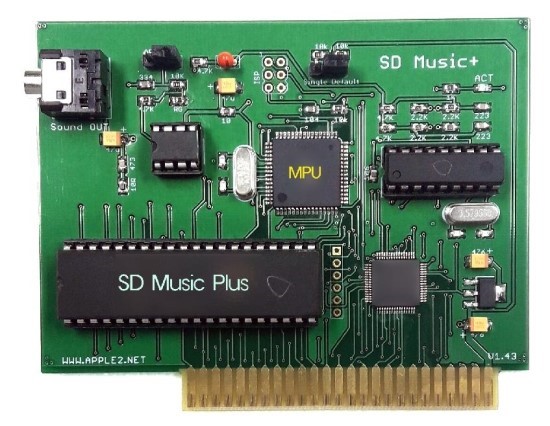
The operating mode can be selected using the SWITCH BLOCK located at the upper-right side of the board.
Right Position: Default Mode
- Supports VGM Player and IMS Player
- Recommended for normal use
- If some Mockingboard software does not produce sound, move the switch to the left position
Left Position: Mockingboard ONLY Mode
- Intended exclusively for Mockingboard-compatible software
- Use this mode when Mockingboard software does not produce sound in Default Mode
SWITCH BLOCK Removed
If the SWITCH BLOCK is removed before powering on the system, the board enters Firmware Update Mode.
There is also a hidden Envelope OFF Mode. While the system is powered on and operating normally, remove the SWITCH BLOCK and then press RESET.
In this mode, envelope effects are disabled and envelope-controlled sounds are played at a fixed volume.
Firmware Update Instructions
- Prepare the attached disk image so that it can be booted.
- Power off the Apple II and remove the SWITCH BLOCK from the SD Music card.
- Install the SD Music (Plus) card in Slot 4.
- Power on the Apple II.If you do not hear the “Ding-Dong” startup sound, the board has an early firmware version without the self-update function. IMS Player, VGM Player, and related features are not supported by this early firmware.
- In this case, send the board to us and we will update it to the latest firmware free of charge. Shipping costs are the responsibility of the user.
- If you hear the “Ding-Dong” startup sound, your board supports self-firmware updating.
- Press Enter to begin the firmware update.
- When the update is completed successfully, the board will repeatedly play a “Ding-Dong, Ding-Dong” sound.
- If an error occurs, the board will repeatedly play a “Ding, Ding” sound. Power the system off and on, and then try the update again.
- After the update has completed successfully, power off the system, return the SWITCH BLOCK to its original position, and use the board normally.
Additional updates may be released later if further issues are found or improvements are required.
** Why didn’t this software work before?
The 6522 mode used by this software conflicted with the SD Music card’s command mode.
The new firmware now provides a switch setting that disables command mode.
In this setting, the card operates only as a Mockingboard, allowing the software to work correctly.
'◆ SD Music card' 카테고리의 다른 글
| SD Musix Deluxe Firmware V1.0E (0) | 2026.07.06 |
|---|---|
| IMS Music player for SD Music Card (0) | 2026.06.09 |
| IMS PLAYER for SD Music Deluxe (0) | 2026.06.05 |
| IMS Player revising (0) | 2026.05.24 |
| IMS Player was started (0) | 2026.05.16 |