

Standard Mockingboard INITIALIZATION
◆ SD Music card / 2026. 7. 14. 22:06

How to solve the compatibility issue with the SD Music card.
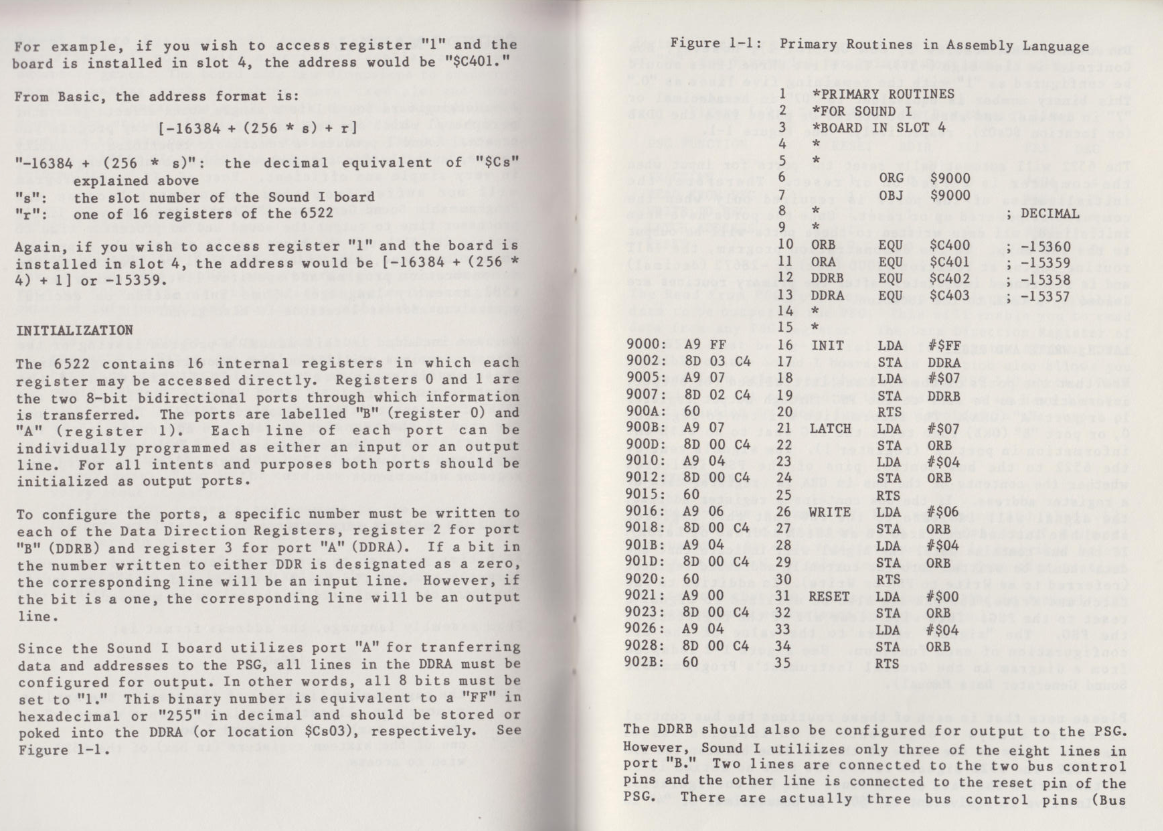
Most older Mockingboard programs correctly follow the official initialization procedure:
LDA #$FF
STA DDRA

LDA #$07
STA DDRB
It is the initialization procedure documented by Sweet Micro Systems, the original manufacturer of the Mockingboard.
However, a small number of programs do not follow this standard and initialize both DDRA and DDRB with #$FF.
This can cause compatibility problems with enhanced Mockingboard-compatible cards such as the SD Music Plus and SD Music Deluxe.
SD Music cards provide additional features, including selectable instruments and direct commands for the OPLL and OPL3 sound chips.
The upper Port B lines, which are unused under the original Mockingboard specification, are used to distinguish normal Mockingboard data from these extended commands.
When software follows the official initialization and sets DDRB to #$07, only PB0–PB2 are configured as outputs.
PB3–PB7 remain inputs, exactly as specified in the original Sweet Micro Systems documentation.
When software incorrectly sets DDRB to #$FF, PB3–PB7 also become outputs.
This can cause ordinary Mockingboard control values to be interpreted as SD Music extended commands.
In practice, when Mockingboard software does not work correctly with an SD Music Plus or Deluxe card, incorrect DDRB initialization is the cause in almost every case.
Please update the program to follow the original Sweet Micro Systems initialization procedure:
LDA #$FF
STA DDRA

LDA #$07
STA DDRB
Following the official Mockingboard initialization standard will maximize compatibility with the original Mockingboard and with modern compatible sound cards.
'◆ SD Music card' 카테고리의 다른 글
| SD Music Plus Firmware V1.0E (1) | 2026.07.13 |
|---|---|
| SD Musix Deluxe Firmware V1.0E (0) | 2026.07.06 |
| IMS Music player for SD Music Card (0) | 2026.06.09 |
| IMS PLAYER for SD Music Deluxe (0) | 2026.06.05 |
| IMS Player revising (0) | 2026.05.24 |